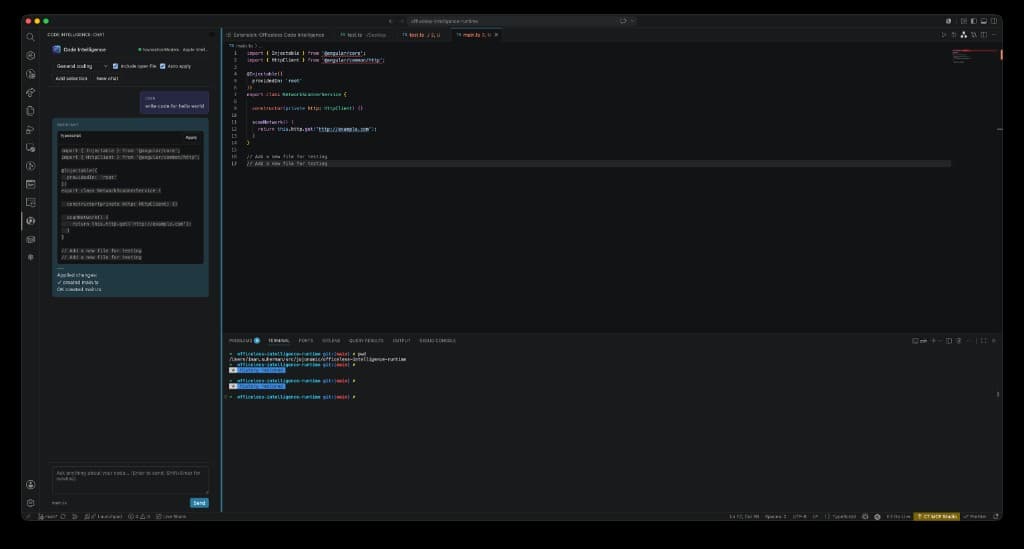
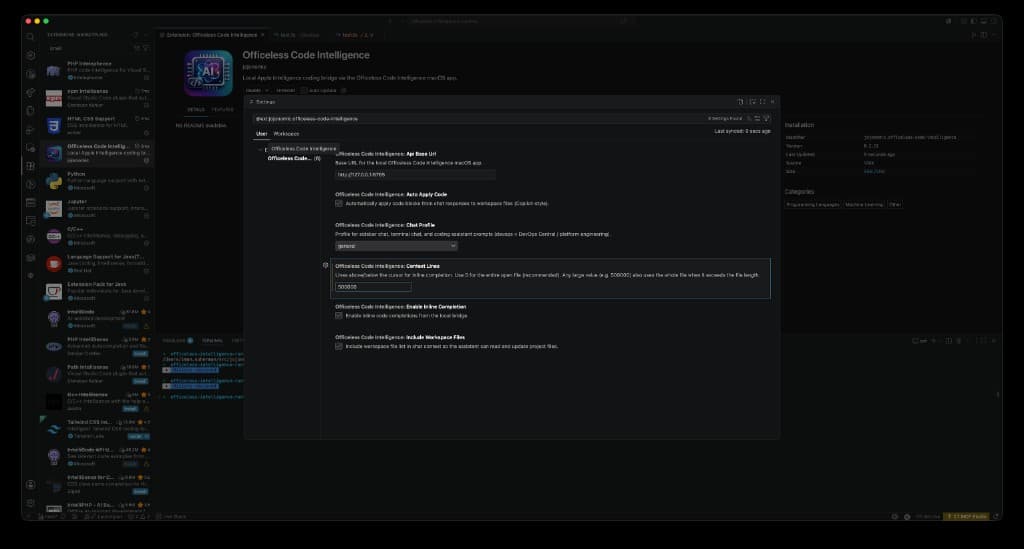
Choose an inference backend
All three backends share the same sidebar chat, inline completion, explain/refactor commands, and auto-apply. Switch anytime from VS Code settings or the Command Palette.
| Backend | Setting value | Best for | Requires |
|---|
| Apple Intelligence | local-bridge | On-device inference on Apple Silicon; terminal chat (Codex-style REPL) | macOS menu bar app on :8765 |
| Alibaba Token Plan | alibaba-token-plan | Org-hosted Qwen, DeepSeek, Kimi, GLM, and more — no local GPU | Token Plan API key from InfoSec |
| Ollama (self-hosted) | suherman-ollama | Local ollama or team gateway; coding-focused models with auto routing | Local Ollama on :11434, or gateway API key |
Backend A
Apple Intelligence (local)
Code stays on your Mac. Requires the macOS menu bar app running on localhost:8765.
Prerequisites
- macOS 14+ (Apple Intelligence: macOS 26+)
- Install the macOS app and confirm the menu bar bridge is running
- Verify:
curl http://127.0.0.1:8765/v1/status
Configure in VS Code
- Command Palette (⇧⌘P) → Officeless: Use Apple Intelligence
- Or set Inference Backend to
local-bridge - Set Api Base Url to
http://127.0.0.1:8765 - Command Palette → Officeless: Check Bridge Status
{
  "officelessCodeIntelligence.inferenceBackend": "local-bridge",
  "officelessCodeIntelligence.apiBaseUrl": "http://127.0.0.1:8765",
  "officelessCodeIntelligence.enableInlineCompletion": true,
  "officelessCodeIntelligence.contextLines": 0,
  "officelessCodeIntelligence.chatProfile": "general",
  "officelessCodeIntelligence.autoApplyCode": true,
  "officelessCodeIntelligence.includeWorkspaceFiles": true
}
Terminal chat (Officeless: Open Terminal Chat) requires this backend. See the Codex integration guide.
Backend B
Alibaba Token Plan (cloud)
Organization-hosted models via Anthropic-compatible API. No macOS app required — works on any machine with VS Code and a Token Plan API key from InfoSec.
Prerequisites
- Token Plan API key from your InfoSec team
- Endpoint:
https://token-plan.ap-southeast-1.maas.aliyuncs.com/apps/anthropic
Configure in VS Code
- Command Palette → Officeless: Use Alibaba Token Plan
- Command Palette → Officeless: Configure Token Plan API Key
- Pick a model in settings or the chat toolbar (default
qwen3.7-plus) - Command Palette → Officeless: Check Token Plan Status
{
  "officelessCodeIntelligence.inferenceBackend": "alibaba-token-plan",
  "officelessCodeIntelligence.tokenPlanBaseUrl": "https://token-plan.ap-southeast-1.maas.aliyuncs.com/apps/anthropic",
  "officelessCodeIntelligence.tokenPlanModel": "qwen3.7-plus",
  "officelessCodeIntelligence.enableInlineCompletion": true,
  "officelessCodeIntelligence.contextLines": 0,
  "officelessCodeIntelligence.chatProfile": "general",
  "officelessCodeIntelligence.autoApplyCode": true,
  "officelessCodeIntelligence.includeWorkspaceFiles": true
}
Supported models include qwen3.7-max, qwen3.7-plus, qwen3.6-flash, deepseek-v4-pro, kimi-k2.6, glm-5, MiniMax-M2.5, and more. Switch models from the chat toolbar without restarting.
Backend C
Ollama (self-hosted)
Run coding models on your own hardware with Ollama, or use the team gateway at ai.suherman.net. OpenAI-compatible chat API — no macOS bridge required.
Option 1 — Local Ollama (fully self-hosted)
- Install Ollama and pull a coding model, e.g.
ollama pull qwen2.5-coder:7b - Confirm Ollama is listening on
http://localhost:11434 - Command Palette → Officeless: Use ai.suherman.net (Ollama), then set Ollama Ai Base Url to
http://localhost:11434 (no API key needed for localhost)
Option 2 — Team gateway (hosted Ollama)
- Create an API key at ai.suherman.net/admin
- Command Palette → Officeless: Use ai.suherman.net (Ollama)
- Command Palette → Officeless: Configure ai.suherman.net API Key
Models & auto routing
Set Ollama Ai Model to auto to route by task complexity (simple → 3B, coding/plan/review → 7B), or pick explicitly: qwen2.5-coder, deepseek-coder, codellama, codegemma, starcoder2, and more. Enable Enable Large Models for 30B on 32 GB+ hosts.
{
  "officelessCodeIntelligence.inferenceBackend": "suherman-ollama",
  "officelessCodeIntelligence.ollamaAiBaseUrl": "http://localhost:11434",
  "officelessCodeIntelligence.ollamaAiModel": "auto",
  "officelessCodeIntelligence.planOllamaUrl": "http://localhost:11434",
  "officelessCodeIntelligence.enableInlineCompletion": true,
  "officelessCodeIntelligence.contextLines": 0,
  "officelessCodeIntelligence.chatProfile": "general",
  "officelessCodeIntelligence.autoApplyCode": true,
  "officelessCodeIntelligence.includeWorkspaceFiles": true
}
For the team gateway, use https://ai.suherman.net as Ollama Ai Base Url instead of localhost.
Developer install (optional)
git clone https://bitbucket.org/jojocoders/officeless-code-intelligence.git
cd officeless-code-intelligence
npm run extension:install
# Open extension/ in VS Code and press F5